What's new on the Companies table in Codat Portal

We are rolling out a series of improvements to the Companies table in the Codat Portal that make it easier to see which systems each companyCompany In Codat, a company represents your customer's business entity. Companies can have multiple connections to different data sources. is connected to, customize the columns you care about, and drill into connectionConnection A link between a Codat company and a data source (like an accounting platform). Each connection represents authorized access to pull or push data from that platform. details without leaving the table.
What's new?
Throughout May 2026, we are shipping a set of updates to the Companies table in the Codat Portal. Some are already live; others are rolling out over the coming weeks.
Platforms column
A dedicated Platforms column now sits between the ConnectionConnection A link between a Codat company and a data source (like an accounting platform). Each connection represents authorized access to pull or push data from that platform. and Created columns on the Companies table, restoring the at-a-glance view of which integrations each companyCompany In Codat, a company represents your customer's business entity. Companies can have multiple connections to different data sources. has connected.
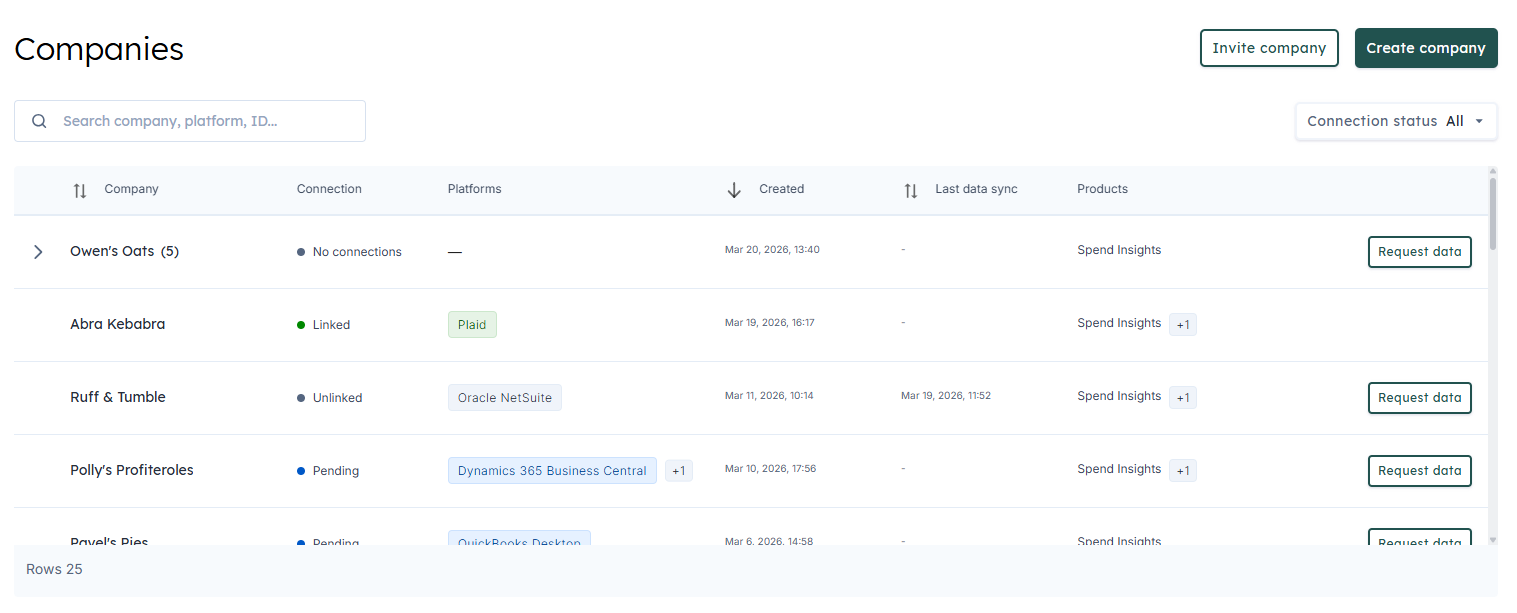
- Pill colours reflect the connectionConnection A link between a Codat company and a data source (like an accounting platform). Each connection represents authorized access to pull or push data from that platform. state for each platform: green for linked, amber for deauthorized, grey for unlinked, and neutral for pending authorization.
- When a companyCompany In Codat, a company represents your customer's business entity. Companies can have multiple connections to different data sources. has more platforms than fit in the column, a +N chip indicates how many additional integrations are connected.
- Hovering the cell opens a tooltip with the connectionConnection A link between a Codat company and a data source (like an accounting platform). Each connection represents authorized access to pull or push data from that platform. status, the full list of platforms with status indicators, and — for parent rows with subsidiaries — an X/Y companies counter showing how many subsidiaries are connected.
- Searching by a platform name in the table search input filters the rows, with matches highlighted in the pills.
ConnectionConnection A link between a Codat company and a data source (like an accounting platform). Each connection represents authorized access to pull or push data from that platform. details in one click (coming soon)
Platform pills, the +N chip, and the connectionConnection A link between a Codat company and a data source (like an accounting platform). Each connection represents authorized access to pull or push data from that platform. status will become clickable. Selecting any of them opens a connectionsConnection A link between a Codat company and a data source (like an accounting platform). Each connection represents authorized access to pull or push data from that platform. panel for that companyCompany In Codat, a company represents your customer's business entity. Companies can have multiple connections to different data sources. — without leaving the table.
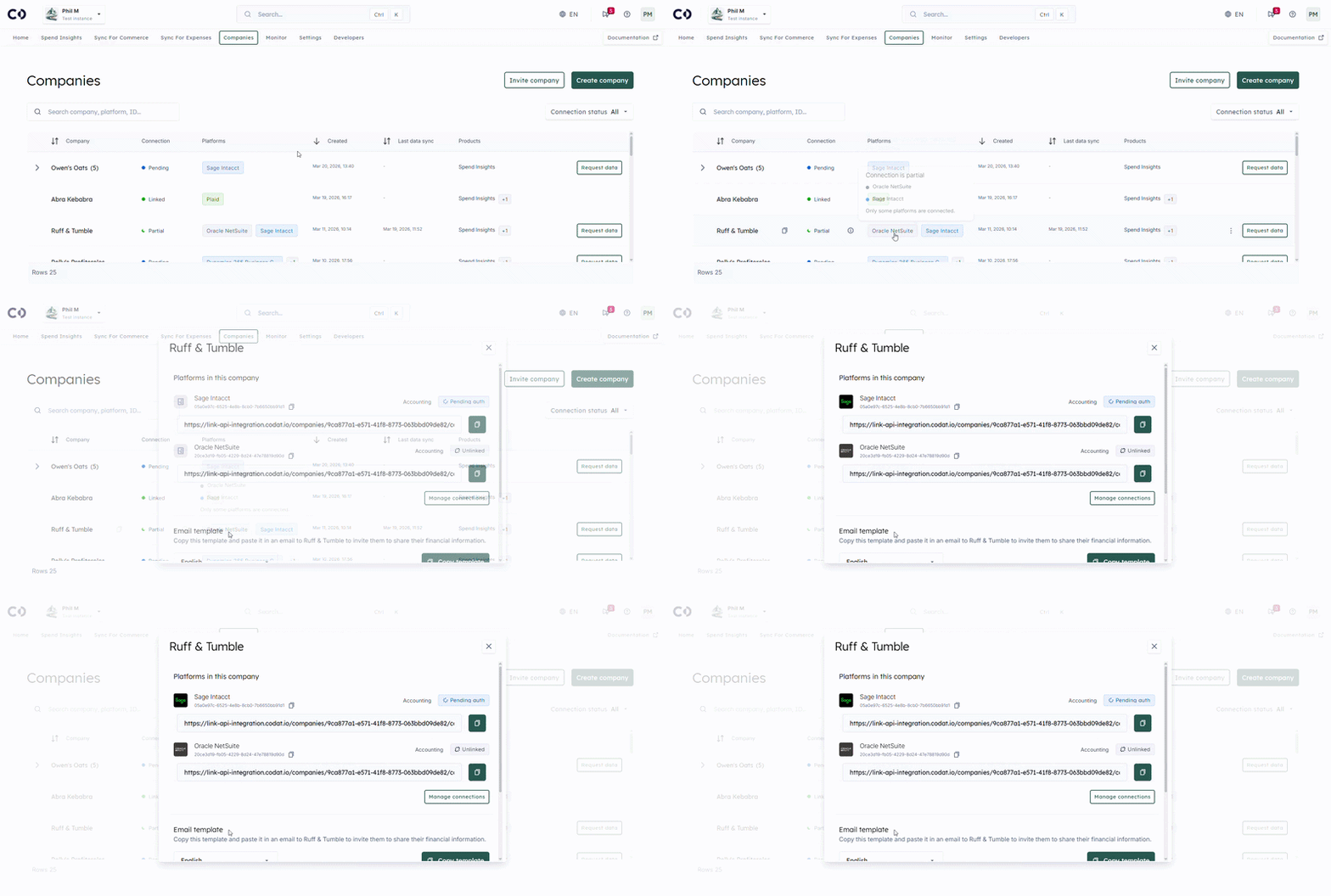
- Every connectionConnection A link between a Codat company and a data source (like an accounting platform). Each connection represents authorized access to pull or push data from that platform. for the companyCompany In Codat, a company represents your customer's business entity. Companies can have multiple connections to different data sources. is listed with its logo, platform name, connectionConnection A link between a Codat company and a data source (like an accounting platform). Each connection represents authorized access to pull or push data from that platform. ID, source type, and live status pill.
- When one or more connectionsConnection A link between a Codat company and a data source (like an accounting platform). Each connection represents authorized access to pull or push data from that platform. have errors, an info-style alert appears above the list showing a count of affected connectionsConnection A link between a Codat company and a data source (like an accounting platform). Each connection represents authorized access to pull or push data from that platform. and a quick linkLink The authorization flow that allows end users to connect their accounting, banking, or commerce platforms to your application via Codat. to manage them.
- A Manage connectionsConnection A link between a Codat company and a data source (like an accounting platform). Each connection represents authorized access to pull or push data from that platform. button takes you straight to that companyCompany In Codat, a company represents your customer's business entity. Companies can have multiple connections to different data sources.'s connectionsConnection A link between a Codat company and a data source (like an accounting platform). Each connection represents authorized access to pull or push data from that platform. page when you want to dig in further.
Customizable columns (coming soon)
A new Columns dropdown will let you choose which columns appear on the Companies table, with your selection remembered the next time you open the page.
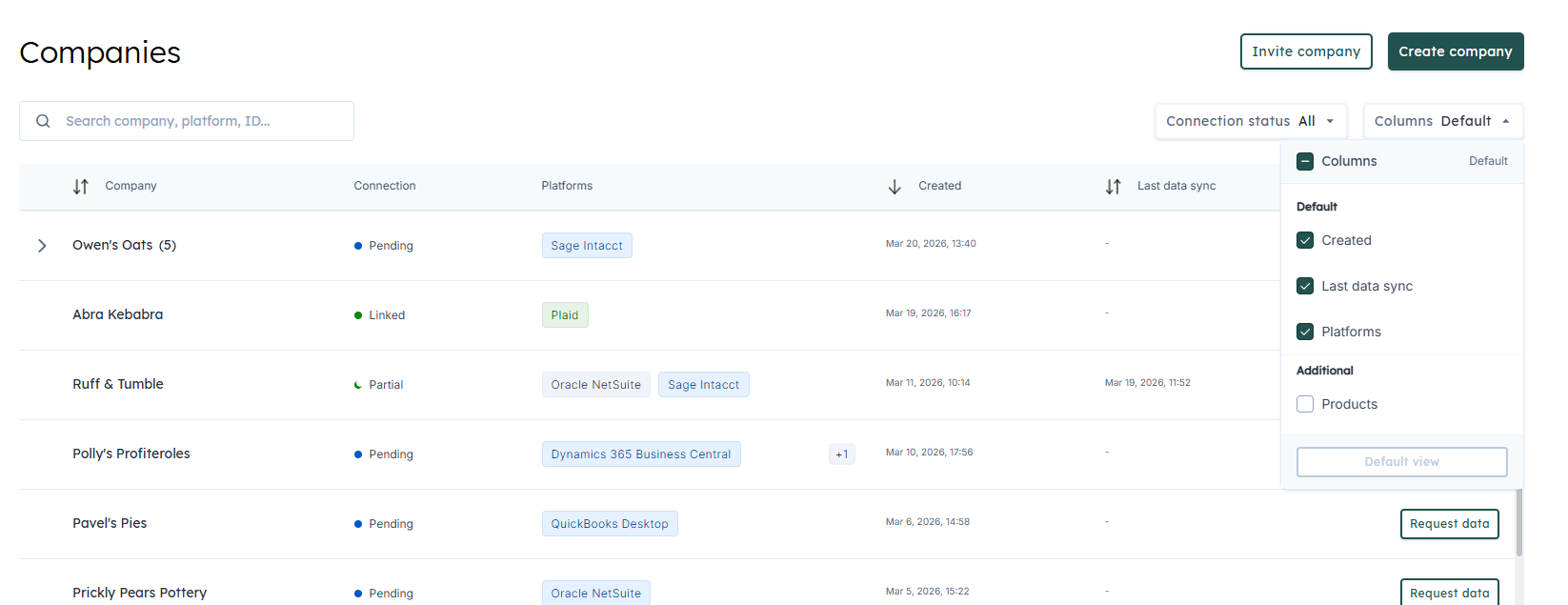
- Columns are split into two groups: Default (Created date, Last data syncSync The process of fetching the latest data from a connected data source. Syncs can be triggered manually or run automatically on a schedule., Platforms) and Additional (Products).
- A header checkbox toggles all optional columns at once, and a Default view footer button resets your selection back to the defaults.
- The dropdown trigger summarizes the current state — Default, All, or N/total — so you can see at a glance how your view is configured.
- The same dropdown will appear on the Subsidiaries page, with your selection shared between the two views so your preference follows you.
- CompanyCompany In Codat, a company represents your customer's business entity. Companies can have multiple connections to different data sources. name and ConnectionConnection A link between a Codat company and a data source (like an accounting platform). Each connection represents authorized access to pull or push data from that platform. status stay locked on and are not listed in the dropdown.
Last data syncSync The process of fetching the latest data from a connected data source. Syncs can be triggered manually or run automatically on a schedule. column rename
The previous Last Updated column has been renamed to Last data syncSync The process of fetching the latest data from a connected data source. Syncs can be triggered manually or run automatically on a schedule. to more accurately describe the value: the timestamp of the most recent successful data exchange across all of a companyCompany In Codat, a company represents your customer's business entity. Companies can have multiple connections to different data sources.'s connectionsConnection A link between a Codat company and a data source (like an accounting platform). Each connection represents authorized access to pull or push data from that platform..
- Companies with no successful syncSync The process of fetching the latest data from a connected data source. Syncs can be triggered manually or run automatically on a schedule. render an em dash (—) and sort to the bottom of the list in both directions.
- Date values render in your selected locale (English or Canadian French).
Who is this relevant for?
These updates benefit all customers who use the Codat Portal to manage their companies, and are especially useful for implementation, support, and customer-facing teams who need to quickly identify which systems each companyCompany In Codat, a company represents your customer's business entity. Companies can have multiple connections to different data sources. is connected to, customize their view, and triage connectionConnection A link between a Codat company and a data source (like an accounting platform). Each connection represents authorized access to pull or push data from that platform. issues.
How to get started?
No action is required to benefit from these updates. Open the Companies or Subsidiaries page in the Codat Portal to see the shipped improvements, and watch this space for the column selector and one-click connectionsConnection A link between a Codat company and a data source (like an accounting platform). Each connection represents authorized access to pull or push data from that platform. panel rolling out over the coming weeks.